Use your own songs
Start with the included Rock Demo Song in Easy or Full, then import standard MIDI files or Guitar Pro drum charts for the songs you want to learn.
Score Drummer turns your electronic drum kit into a song-based practice system. Import a MIDI or Guitar Pro drum part, connect your e-kit over USB MIDI, slow down difficult sections, and get timing feedback while you play.
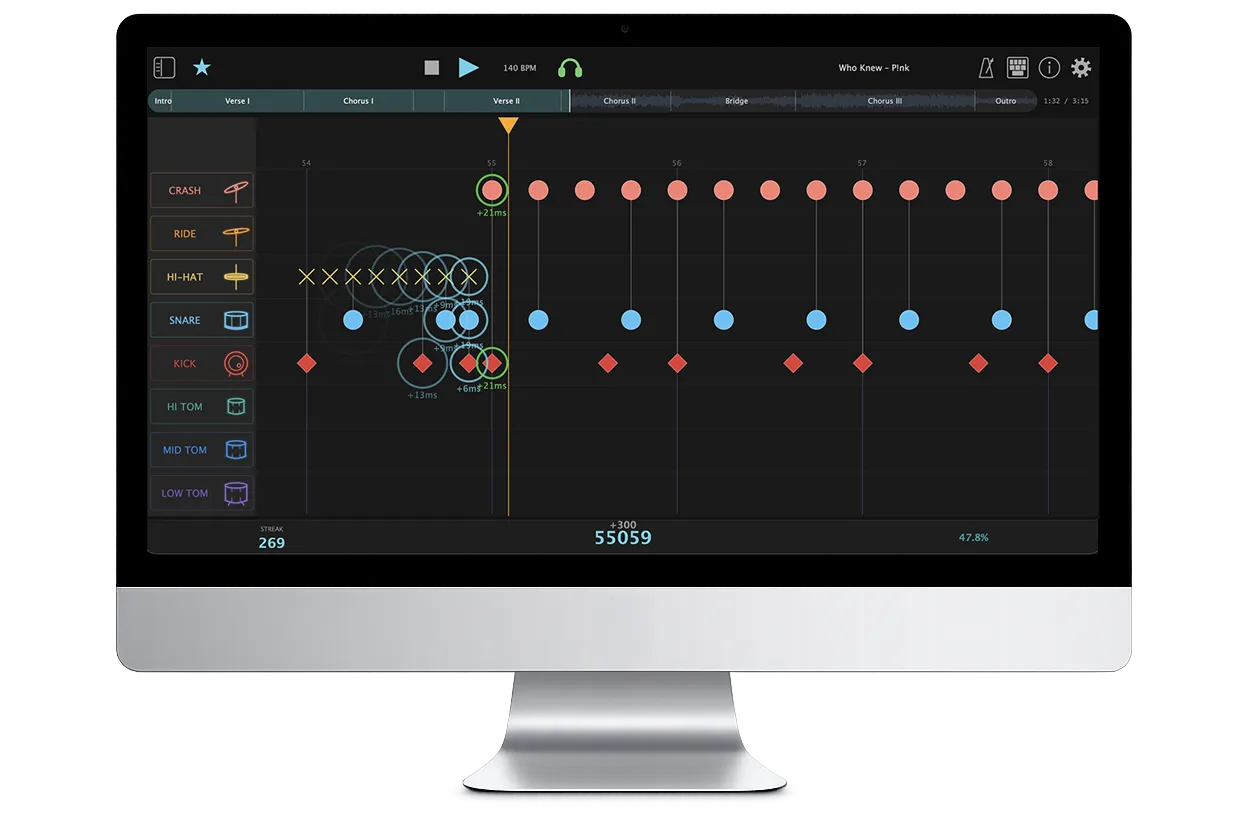
Most e-kit practice tools stop at a metronome, backing track, or lesson library. Score Drummer is for players who want to practice actual drum charts and see what happened on every hit.
Start with the included Rock Demo Song in Easy or Full, then import standard MIDI files or Guitar Pro drum charts for the songs you want to learn.
Use USB MIDI input from electronic drum kits and MIDI controllers. Score Drummer evaluates the notes you actually play.
Slow down sections in Practice Mode, then switch to Perform Mode for a scored full-tempo run with review data.
Load .mid, .midi, .gp, .gp3, .gp4, .gp5, and .gpx files and let the app build a playable drum score.
Route your kit's notes to Score Drummer lanes, including non-GM modules, and save presets for later sessions.
Use tempo scaling and looping to isolate a fill, groove, or transition before trying the complete song.
See Perfect, Good, Early, Late, Miss, and Extra markers so practice feedback is specific instead of vague.
Download Score Drummer and turn imported drum parts into focused practice sessions.
Download Score Drummer